


字符串
什么是字符串
字符串是由数字、字母或特殊符号组成的一串字符,用于表示文本数据。在 Java 中字符串是一种引用类型,由 String 所定义。
创建字符串
字符串可以用字面量的方式直接创建:
String str = "Hello World";
也可以使用 new 关键字创建:
String str = new String();
String str = new String("Hello World");
String str = new String(new char[]{'H', 'e', 'l', 'l', 'o', ' ', 'W', 'o', 'r', 'l', 'd'});
字符串的不可变性
Java 中的字符串一旦被创建,其内容就不能被修改,任何修改操作(如拼接、替换)都会生成新字符串对象,而原字符串不变:
String s1 = "Hello";
// 这里会创建新对象"Hello World",s1 仍然是"Hello"
String s2 = s1 + " World";
字符串常量池(String Pool)
Java 中有一个特殊的内存区域叫字符串常量池,用来存储字符串字面量:
String s1 = "Java";
// 这里不会创建新对象,而是复用字符串常量池中的"Java"
String s2 = "Java";
// 这里编译器会将 "Ja" + "va" 优化成"Java",并复用字符串常量池中的"Java"
String s4 = "Ja" + "va";
// 此时 s1 == s2 == s3
System.out.println(s1 == s2); // true
System.out.println(s1 == s3); // true

String s5 = "Ja";
// 由于是 s5 是变量,变量具有不确定性,所以编译器不会优化,所以这里不会复用常量池中的"Java",而是动态的创建一个新的 String 对象进行拼接
String s6 = s5 + "va";
// 此时 s1 != s6
System.out.println(s1 == s6); // false
字符串的底层实现
JDK 1.8 以及之前使用 char[] 来存储字符,JDK 1.9 开始使用 byte[] 来存储字符,同时增加一个 byte 类型的 coder 字段来存储字符编码。
JDK 1.8 源码:
public final class String
    implements java.io.Serializable, Comparable<String>, CharSequence {
    /** The value is used for character storage. */
    private final char value[];
}
JDK 1.11 源码:
public final class String
        implements java.io.Serializable, Comparable<java.lang.String>, CharSequence {

    /**
     * The value is used for character storage.
     *
     * @implNote This field is trusted by the VM, and is a subject to
     * constant folding if String instance is constant. Overwriting this
     * field after construction will cause problems.
     *
     * Additionally, it is marked with {@link Stable} to trust the contents
     * of the array. No other facility in JDK provides this functionality (yet).
     * {@link Stable} is safe here, because value is never null.
     */
     @Stable
     private final byte[] value;

    /**
     * The identifier of the encoding used to encode the bytes in
     * {@code value}. The supported values in this implementation are
     *
     * LATIN1
     * UTF16
     *
     * @implNote This field is trusted by the VM, and is a subject to
     * constant folding if String instance is constant. Overwriting this
     * field after construction will cause problems.
     */
     private final byte coder;
}
JDK 1.8 之后将 String 的底层实现由 char 改成了 byte 的原因
在 JDK 9 引入的 Compact Strings 特性中,String 的内部存储由 char[](每个字符固定占 2 字节)改为 byte[] + coder 的方案,其核心原因是降低内存占用,从而提升运行时性能。
- 实际业务中,大部分字符串只包含拉丁字符(ISO-8859-1),这些字符使用单字节就可以表示,而用
char存储会白白浪费一半空间。 - 改为
byte[]后,如果字符串中的内容全部可以用 Latin-1 编码,就用 1 个字节保存。只有包含无法压缩的字符时才使用 UTF-16(2 字节)。JVM 通过额外的coder字段来标识当前编码(取值可能为LATIN1或UTF16)。 - 内存占用的减少可以直接减少 GC 所带来的压力、更好的缓存命中率,从而提升整体性能。
所以,JDK 在 1.8 之后(从 1.9 开始)使用 byte[] 取代 char[],有机会使用单字节来存储字符,节省内存空间,并提高程序执行效率。
字符串中常用的方法
length():返回字符串长度。String s = "Hello"; System.out.println(s.length()); // 5charAt(int index):取得指定索引处的字符(索引从 0 开始)。String s = "Java"; System.out.println(s.charAt(2)); // vsubstring(int begin)和substring(int begin,int end):截取子串,第二个参数end不包含在结果内。String s = "Hello,World"; System.out.println(s.substring(6)); // World System.out.println(s.substring(0, 5)); // Hellocontains(CharSequence seq):判断是否包含指定序列。String s = "student"; System.out.println(s.contains("stu")); // trueindexOf(String str)和lastIndexOf(String str):查找子串首次、最后一次出现的位置,如果未找到返回–1。String s = "I am a good cat"; System.out.println(s.indexOf("a")); // 2 System.out.println(s.indexOf("b")); // -1 System.out.println(s.indexOf("good", 3)); // 7 System.out.println(s.lastIndexOf("a")); // 13equals(Object obj)和equalsIgnoreCase(String str):比较内容是否相等;后者忽略大小写。String a = "Java"; String b = "java"; System.out.println(a.equals(b)); // false System.out.println(a.equalsIgnoreCase(b)); // truecompareTo(String str)和compareToIgnoreCase(String str):按字典序比较大小;后者忽略大小写,小于返回负数、等于返回 0、大于返回正数。System.out.println("abc".compareTo("abd")); // -1 System.out.println("Abc".compareToIgnoreCase("abc")); // 0startsWith(String prefix)和endsWith(String suffix):判断前缀或后缀。String s = "helloworld"; System.out.println(s.startsWith("hello")); // true System.out.println(s.endsWith("ld")); // truesplit(String regex):按正则表达式分割为字符串数组。String s = "a,b,c"; String[] arr = s.split(","); System.out.println(Arrays.toString(arr)); // [a, b, c]concat(String str)(等价于 “+” ):拼接字符串。String s = "hello".concat(" world"); System.out.println(s); // hello worldreplace(char oldC,char newC)和replace(CharSequence t,CharSequence r):替换字符或子串。String s = "banana"; System.out.println(s.replace('a','o')); // bonono System.out.println("Java".replace("va","VA")); // JaVAreplaceAll(String regex,String repl):按正则批量替换。String s = "a1b2c3"; System.out.println(s.replaceAll("\\d","")); // abctoLowerCase()和toUpperCase():大小写转换。System.out.println("Java".toUpperCase()); // JAVAtrim()(JDK 11 及以上可用strip()):去除首尾空白字符。String s = " text "; System.out.println(s.trim()); // "text"toCharArray():转换为 char 数组。char[] chars = "Hello".toCharArray(); System.out.println(chars[0]); // HgetBytes():按平台默认字符集转换成字节数组。byte[] data = "abc".getBytes(); System.out.println(Arrays.toString(data)); // [97, 98, 99]format(String format, Object... args):格式化字符串。System.out.println(String.format("Name: %s, Age: %d", "Alice", 25)); // "Name: Alice, Age: 25"valueOf(Object obj):转换为字符串。System.out.println(String.valueOf(123)); // "123" System.out.println(String.valueOf(null)); // "null"
字符串类的体系结构
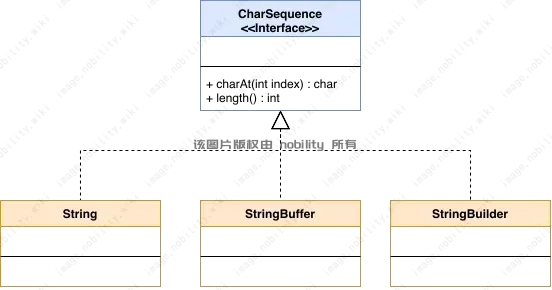
StringBuilder 和 StringBuffer
因为 Java 中的 String 是不可变的,每次对字符串的修改都会创建新对象,频繁修改字符串会产生大量临时对象,从而严重影响性能。而 StringBuilder 和 StringBuffer 可以直接在原对象上修改,所以对于频繁修改字符串的场景,可以使用 StringBuilder 或 StringBuffer。
性能对比示例:
public class Dome {
    public static void main(String[] args) {
        // 迭代次数
        final int ITERATIONS = 100000;

        // 使用普通字符串拼接
        long start1 = System.currentTimeMillis();
        String str = "";
        for (int i = 0; i < ITERATIONS; i++) {
            // 每次都会创建新 String 对象
            str += "a";
        }
        long end1 = System.currentTimeMillis();
        System.out.println("字符串拼接耗时: " + (end1 - start1) + "ms");

        // 使用 StringBuilder 拼接
        long start2 = System.currentTimeMillis();
        StringBuilder sb = new StringBuilder();
        for (int i = 0; i < ITERATIONS; i++) {
            // 直接修改内部字符数组
            sb.append("a");
        }
        long end2 = System.currentTimeMillis();
        System.out.println("StringBuilder 耗时: " + (end2 - start2) + "ms");
    }
}
StringBuilder 和 StringBuffer 的区别
StringBuilder:非线程安全,性能更高StringBuffer:线程安全(方法均使用synchronized修饰),性能稍低
StringBuilder 和 StringBuffer 中常用的方法
下列方法两种类的用法完全一致,仅在线程安全上有差异。
- 构造器:默认容量 16,或指定容量,或初始内容。
StringBuilder sb0 = new StringBuilder(); // 空,容量16
StringBuilder sb1 = new StringBuilder(32); // 指定容量32
StringBuilder sb2 = new StringBuilder("Hello"); // 以"Hello"开头
append(Object obj):追加内容到末尾。StringBuilder sb = new StringBuilder("Hello"); sb.append(", Java ").append(8); System.out.println(sb); // Hello, Java 8insert(int offset, Object obj):在指定下标插入。StringBuilder sb = new StringBuilder("Hello, Java!"); sb.insert(7, "world and "); System.out.println(sb); // Hello, world and Java!delete(int start, int end):删除区间 字符。StringBuilder sb = new StringBuilder("Hello, world and Java!"); sb.delete(0, 7); System.out.println(sb); // world and Java!replace(int start, int end, String str):用新串替换区间。StringBuilder sb = new StringBuilder("Hello, world"); sb.replace(7, 12, "java"); // 将 world 替换为 java System.out.println(sb); // "Hello, java"reverse():原地反转字符序列。StringBuffer bf = new StringBuffer("abcd"); bf.reverse(); System.out.println(bf); // dcbalength():实际字符数。StringBuffer bf = new StringBuffer("Hello, world"); // 长度 12 System.out.println(bf.length()); // 12capacity():返回当前缓冲区容量。StringBuffer bf = new StringBuffer("Hello, world"); // 长度 12,容量 12 + 16 = 28 System.out.println(bf.capacity()); // 28charAt(int index):取单个字符。StringBuffer bf = new StringBuffer("Hello, world"); char c = bf.charAt(4); System.out.println(c); // oindexOf(String str)/lastIndexOf(String str):查找子串位置。StringBuffer bf = new StringBuffer("Hello, world"); int first = bf.indexOf("e"); // 1 int last = bf.lastIndexOf("r"); // 9substring(int start, int end):取子串(左闭右开)。StringBuffer bf = new StringBuffer("Hello, world"); String sub = bf.substring(1, 5); System.out.println(sub); // ellotoString():转为不可变String。StringBuilder sb = new StringBuilder("Hello"); String result = sb.toString(); // "Hello"
Comments NOTHING